CCTV is one of the smartest upgrades a small business can make—when it’s designed properly. The right system can deter theft, protect staff, support insurance claims, provide evidence during incidents, and even help you improve operations by understanding customer flow. The wrong system, however, can leave blind spots, unreliable recordings, or poor image quality when you need it most.
This guide breaks down the key decisions: camera types, recording options, image quality, remote viewing, installation planning, and best practices for ongoing maintenance. If you’re choosing CCTV for a shop, office, warehouse, café, or multi-site business, this will help you get a system that actually works when it matters.
Start with the goal: what problem are you solving?
Before choosing equipment, define your priority. Are you trying to deter shoplifting, monitor deliveries, protect cash handling, secure a car park, or keep an eye on a reception area? Your goal determines camera placement, lens choices, and how many cameras you need.
- Deterrence: Visible cameras, signage, strong lighting
- Identification: High-resolution cameras at face height where possible
- Evidence: Reliable recording, correct retention, stable storage
- Operations: Wide views for workflow, entrances, and key zones
Camera types: dome, bullet, turret, and PTZ
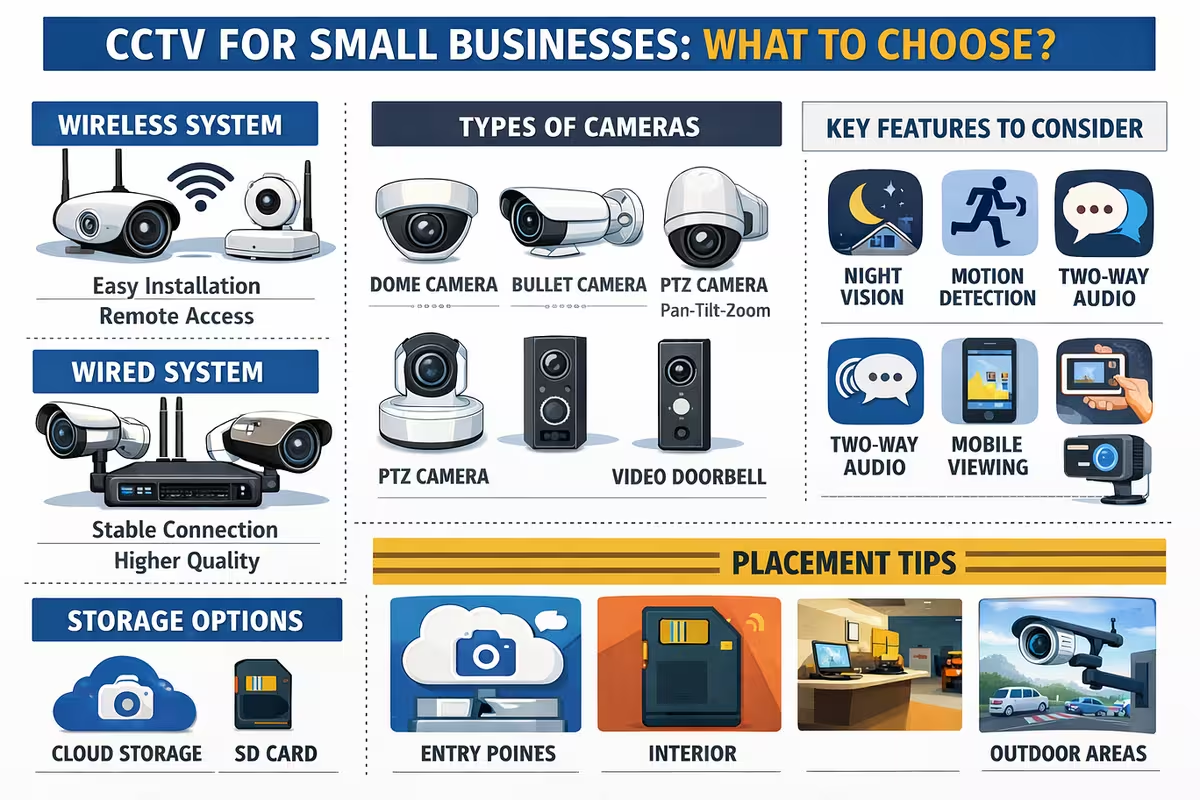
Each camera style has strengths. For most small businesses, a mix of turret or dome cameras indoors and bullet cameras outdoors is common. PTZ cameras are useful for large spaces but are often unnecessary unless you have a dedicated operator or need to patrol wide areas.
- Dome: Discreet, tamper-resistant, good for indoor ceilings
- Turret: Clear image, less glare at night, easy to aim
- Bullet: Great outdoors, visible deterrent, strong weather protection
- PTZ: Pan/tilt/zoom coverage for wide areas, higher cost and planning
Resolution and image quality: why 4MP and 8MP matter
Resolution affects how much detail you can capture—especially for faces, plates, or small objects. But resolution alone doesn’t guarantee great footage. Lens, sensor quality, positioning, and lighting are just as important.
- 2MP (1080p): Basic coverage, good for general monitoring
- 4MP: Strong balance of detail and storage needs
- 8MP (4K): Excellent detail, ideal for key entrances and high-risk zones
For many small businesses, placing higher-resolution cameras at entrances, tills, and loading areas gives the best value, while standard cameras cover lower-risk zones.
Night vision and lighting
Incidents often happen in low light. Good CCTV planning includes lighting strategy. Infrared (IR) helps at night, but can be limited by reflections on glass, poor angles, or distance. Consider external lighting for car parks and entrances to improve colour capture and identification.
NVR vs cloud recording
Most professional CCTV systems record to an NVR (Network Video Recorder) on-site. Some setups use cloud storage or hybrid models. The best option depends on your budget, connectivity, and retention requirements.
- NVR recording: Strong reliability and control; needs secure placement
- Cloud recording: Off-site resilience; needs strong upload bandwidth
- Hybrid: Local recording plus key clips to cloud for resilience
Retention: how long should you keep footage?
Retention depends on your risk profile, incident frequency, and policy. Many businesses aim for 14–30 days, but higher retention requires more storage. The number of cameras, resolution, frame rate, and compression all affect how long you can store footage.
Remote viewing: secure access is essential
Remote viewing is one of the most requested features, and it’s extremely useful. However, it must be secured properly. Use strong passwords, updated firmware, and avoid unsafe port-forwarding when possible. A properly configured system can provide mobile access without exposing your network to unnecessary risk.
Installation planning: placement is everything
The most common CCTV mistake is poor placement. A camera high in the corner may show a room, but it might not capture faces clearly. Key areas like entrances should have a camera positioned to see faces—ideally front-on. Storage rooms and loading bays should avoid blind spots where incidents occur.
- Cover entrances and exits
- Cover till/cash points clearly
- Cover delivery and loading points
- Cover high-value stock areas
- Cover car parks and perimeter points
Network and bandwidth considerations
IP CCTV runs over your network. If you also use VoIP, cloud apps, and WiFi, you should plan bandwidth and network structure. Segmenting CCTV traffic, using a PoE switch, and ensuring the recorder is protected and stable can dramatically improve reliability.
Maintenance: the part people forget
Cameras can get dirty, knocked, or obstructed. Storage drives can fail. Firmware can become outdated. A simple maintenance routine helps ensure your system works when you need it:
- Check camera angles and focus every quarter
- Clean outdoor lenses
- Verify recording and playback
- Review storage health and disk status
- Keep firmware updated under safe change control
Choosing a professional installer
A good installer will talk about coverage goals, lighting, storage, secure remote access, and retention. They’ll also plan the cable routes cleanly and ensure your system complies with best practices. If you need help selecting the right system, choose a provider who understands connectivity too—because CCTV and broadband performance are closely linked.
Request a CCTV survey or call 0333 358 0556 to plan a reliable system.